MapStacker
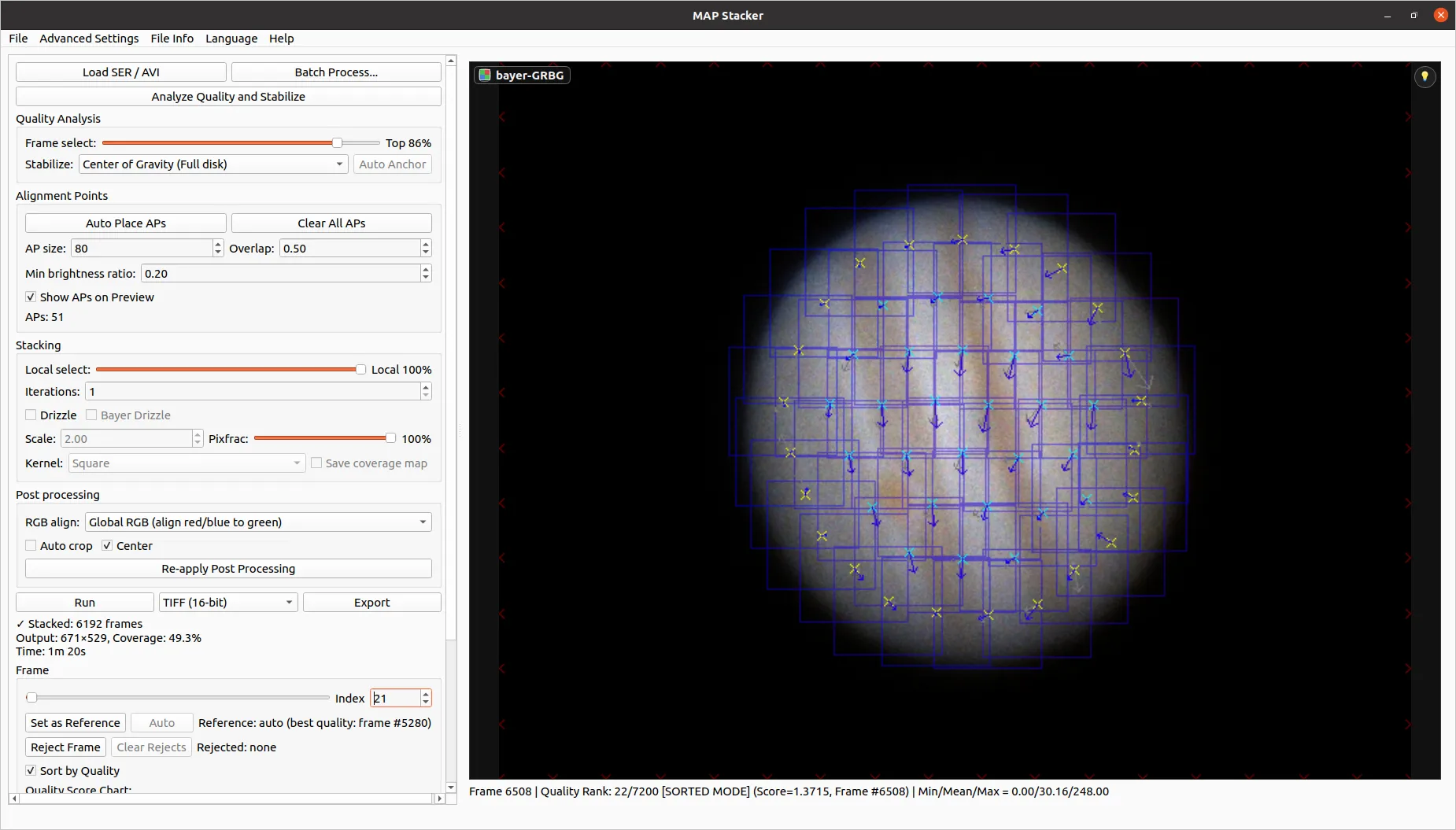
MapStacker is a desktop application for stacking monochrome and colour lunar or planetary image sequences stored in SER or AVI files.
It provides frame quality analysis, global stabilization, multiple alignment points, local frame selection, mesh-based stacking, Drizzle, colour alignment, and output to 16-bit TIFF, PNG, and FITS (plus 8-bit BMP).
Available for Windows, macOS, and Linux. English and Traditional Chinese interfaces are included.
Application window
Features
Input and frame selection
- Monochrome, RGB, and Bayer CFA SER and AVI input
- Frame quality ranking before image resampling
- Manual frame exclusion and reference-frame selection
- Independent local frame selection for each alignment point
Alignment
- Global frame stabilization using phase correlation or centre of gravity
- Automatic alignment-point placement using a centroidal Voronoi grid
- Sub-pixel local alignment with outlier handling
Stacking and colour
- Piecewise affine mesh stacking
- Drizzle processing for monochrome, RGB, and Bayer data
- Several global and local RGB alignment methods
- Batch processing of SER and AVI files in a folder
Output
- Automatic cropping and optional output centring
- 16-bit TIFF, PNG, and FITS output, plus 8-bit BMP
- Text sidecar with settings, source metadata, frame selection, and alignment points
Typical workflow
- Open a SER or AVI file. MapStacker reads the capture and its metadata.
- Analyse frame quality. Review the ranking and exclude unsuitable frames if needed.
- Stabilize the sequence. Estimate and correct global movement.
- Place alignment points. Use automatic placement or adjust the points manually.
- Run the stack. Choose the frame percentages, stacking method, and colour options.
- Export the result. Save the image as a 16-bit TIFF, PNG, or FITS (or 8-bit BMP) with its processing record.
Download
Pre-built packages do not require a Python installation.
Recommended download for your device
Detecting your operating system...
Open latest release pageIf this is not your target machine, use the table below to choose another package.
| Platform | Requirements | Package | Notes |
|---|---|---|---|
| Windows | Windows 10 or 11 (64-bit) | MapStacker-windows-x64.zip | Unzip the archive and run MapStacker.exe. Unsigned application: if SmartScreen warns, choose More info and then Run anyway. |
| macOS (Apple Silicon) | Apple Silicon (arm64) | MapStacker-macos-arm64.zip | Unsigned application. On first launch, right-click and choose Open. |
| macOS (Intel) | Intel (x64) | MapStacker-macos-x64.zip | Unsigned application. On first launch, right-click and choose Open. |
| Linux | x64, glibc 2.31 or newer | MapStacker-linux-x64.zip | Requires a graphical X11 environment with Qt xcb support. |
The packages are distributed as ZIP archives. Download the corresponding .sha256 file from the release page if you want to verify the archive.
Support and issue reports
Bug reports and feature requests are managed through GitHub Issues. Before opening a report, please check whether the same problem has already been reported.
A useful bug report should include the MapStacker version, operating system, steps needed to reproduce the problem, and any relevant screenshot or log.